
Dark mode
Getting started
Okaeri is a cozy companion app for Windows. Her name is Hana (you can rename her), and she lives in a little cottage on a floating island in the sky. She keeps her own daily routine, comes onto your desktop when you want company, talks with you, and remembers you from one day to the next.
What you need
- Windows 10 or 11, 64-bit.
- A graphics card from the last few years. She's drawn in 3D, but the app is light enough to run all day next to your work.
- About 1 GB of free disk space.
- Internet for the free AI that lets her chat freely. Without it she still lives her day and answers with built-in lines.
- Optional: a microphone (to talk with your voice), a phone (to have her on your phone), a PC VR headset (to visit her in VR).
Install
Okaeri is getting ready for Steam. When it's out, install it like any other game and start it from your library.
Testers
If the developer gave you a test build, unzip it and start Okaeri.exe. Windows may show "Windows protected your PC" for new apps: click More info → Run anyway.
Your first minute with her
The first time you start Okaeri, Hana introduces herself and asks a few tiny questions:
- Your name. She'll call you by it and remember it.
- A free AI brain. Click 🔗 Connect OpenRouter, sign in (Google, GitHub or email, no card), and approve. That's all. You can also do this later in ⚙️ Settings → AI, where you'll find two more free options. See Free AI setup.
- How you want to talk: typing, push-to-talk (hold Space), or calling her name. See Talking to her.
- Her voice: keep "Talk out loud" ticked for her free natural voice (a one-time download of about 90 MB).
- Where to start: in her island home, or right on your desktop.
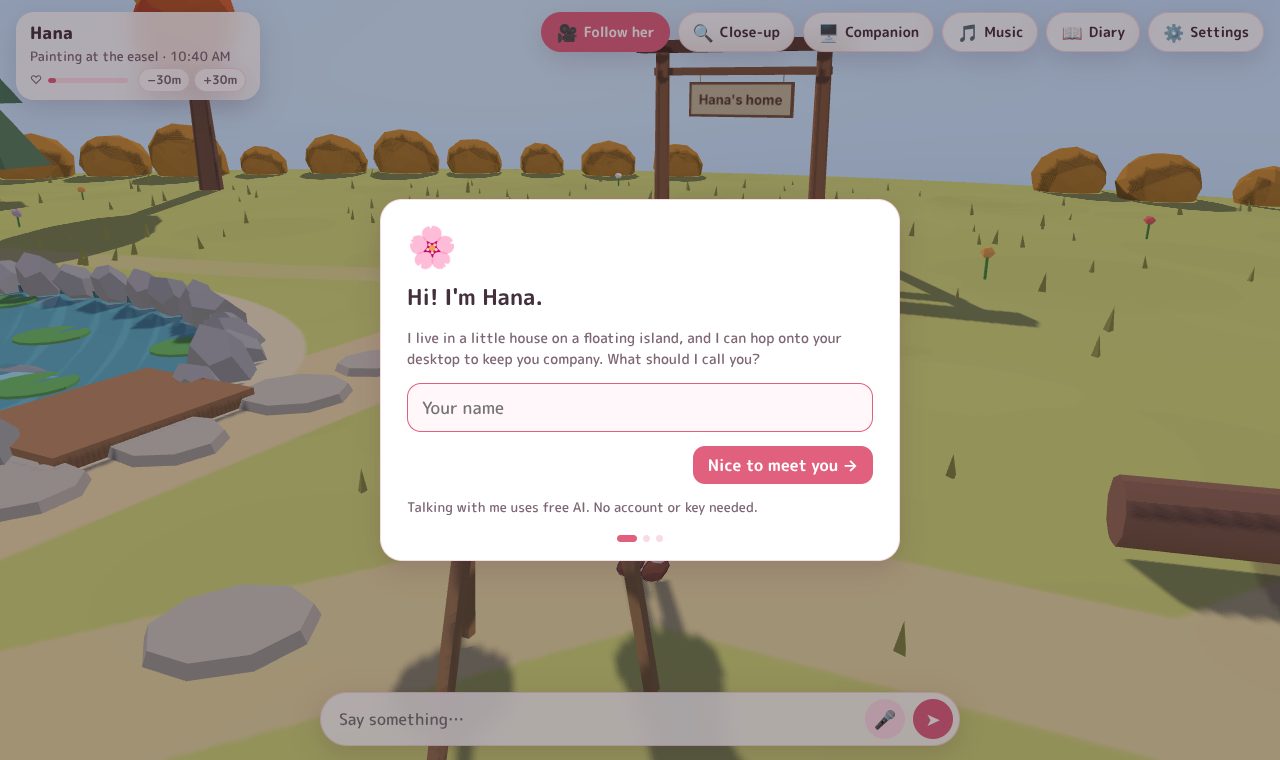
Windows may ask whether Okaeri may use your microphone. Allow it if you want to talk with your voice.
Her home screen
Her home is a window into her island. Here's what you see:
| Where | What it does |
|---|---|
| Top left card | Her name, what she's doing and her time. The ♡ bar shows how close you two are. Click the card to open her diary. |
| −30m / +30m | Peek at her island a little earlier or later (her time shifts; your clock doesn't). |
| ↩ Back to her day | Shows up after you asked her to do something. Click it and she goes back to her own routine. |
| 🎹 Songbook | Choose what she plays (piano, guitar, ukulele, kalimba) or sings, and listen to the songs she wrote herself. See Music. |
| 🎵 Music | Pauses or resumes your own background music. See Music. |
| 🔍 Close-up | Her upper body fills the screen. See Closeness. |
| 🪟 On my desktop | She hops onto your desktop. See On your desktop. |
| 🥽 Visit in VR | Shows up when a VR headset is connected. See In VR. |
| ☰ More | Everything you need now and then (a dot means something in it is on, or a new painting is waiting): |
| 🖼️ Her paintings | The pictures she painted for you. See Her paintings. |
| 📖 Her diary | What she did while you were away. |
| 🎥 Follow her | The camera follows her around. |
| 🖥️ Companion | A calm, always-on view for a second monitor. See Closeness. |
| 📱 On my phone | Shows a QR code for your phone. See On your phone. |
| 👀 Look at my screen / 🎮 Watch me play | She glances at your screen and comments (only if you allow it). See On your desktop. |
| 📘 Player guide | This guide. |
| ⚙️ Settings | Everything else. |
| Chat box | Type and press Enter. 🎤 turns "listen for her name" on or off. |
Moving the camera: drag to look around, scroll to zoom, and double-click the ground to walk the camera over there.
Settings in a nutshell
⚙️ Settings has two modes, switched at the top:
- Easy (the default) shows only what most people need.
- Advanced adds your own AI keys, ElevenLabs voices, speech recognition options, character card fields, time travel and graphics settings.
| Tab | What's in it |
|---|---|
| Her | Characters, name, personality, her look (colors or your own model), dances. |
| AI | Her brain: free accounts (Easy) or any AI provider with your own key (Advanced). |
| Voice | Her voice and how fast she talks. |
| Talking | Typing, push-to-talk or listening for her name. |
| Desktop | Desktop mode, second monitor, phone, VR, close-up, small talk, break reminders, looking at your screen. |
| World | Maps, routines, your own music and the Steam Workshop. |
| Memory | What she knows about you and her notes about each day. You can edit both. |
| About | Version, privacy in short, controls. |
Settings close with Done (or ✕), so you can't lose them by clicking next to the window.
Where to next?
- Talk to her by voice or text.
- Get her a free AI brain if you skipped it.
- Put her on your desktop.
- Find out what she does all day.