
Dark mode
Free AI setup
To really chat with you, Hana needs an AI "brain". Okaeri doesn't sell one: you connect your own free AI account in a minute, and the app uses it from your PC. Nobody shares your quota, and it costs nothing.
Checked October 2026. Free plans change often; the app always shows the current steps in ⚙️ Settings → AI.
The quickest way: OpenRouter in one click
- Open ⚙️ Settings → AI (or use the welcome screen).
- Click 🔗 Connect OpenRouter. Your browser opens openrouter.ai.
- Sign in with Google, GitHub or email (no card needed) and approve.
Done. The card in Settings shows how many free messages are left today.
The free accounts you can connect
Connect one or more. She uses them in turn and switches when one is busy, so more accounts mean more free messages.
| Account | Free messages | Setup | Privacy |
|---|---|---|---|
| OpenRouter | 50 a day; 1,000 a day after a one-time $10 credit | One click, no card | Some free models may keep chats to improve their AI |
| Cloudflare (Workers AI) | About 250 a day (resets at 00:00 UTC) | About 3 minutes, no card | Doesn't keep chats or train on them |
| Groq | About 60 a day per model | About 2 minutes, no card | Not kept by default |
Cloudflare
- Create a free account at dash.cloudflare.com.
- Open Workers AI and click Use REST API.
- Click Create a Workers AI API Token → Create API Token → Copy API Token.
- Copy the Account ID from the same page.
- Paste both into Okaeri (Settings → AI → Cloudflare) and click Save & check.
Groq
- Go to console.groq.com/keys and sign in.
- Click Create API Key and copy it.
- Paste it into Okaeri (Settings → AI → Groq) and click Save & check.
When she can't think
If no account is connected, or all of today's free messages are used up, she tells you honestly and points you to Settings. She keeps living her day and answers head pats and pokes with built-in lines. Free messages come back the next day.
Why these three?
They're free without a card, and they allow apps like Okaeri. A few popular options are left out on purpose:
- Google Gemini's free plan isn't allowed for people in the EU, Switzerland or the UK, requires users to be 18+, and free prompts may be reviewed by humans. A paid Gemini key works in Advanced mode.
- Other "free" offers need a card, allow only a handful of requests a day, or aren't meant for apps.
- Sharing one account between many players is against the providers' terms. That's why everyone connects their own.
Advanced mode: your own keys
Want a specific AI, a paid model with an even richer personality, or a model on your own PC? Open ⚙️ Settings, switch to Advanced at the top, then AI. Pick a provider, paste a key and press Load models to choose one. Test her brain checks that it works.
Your keys stay on your PC and go only to the provider you picked.
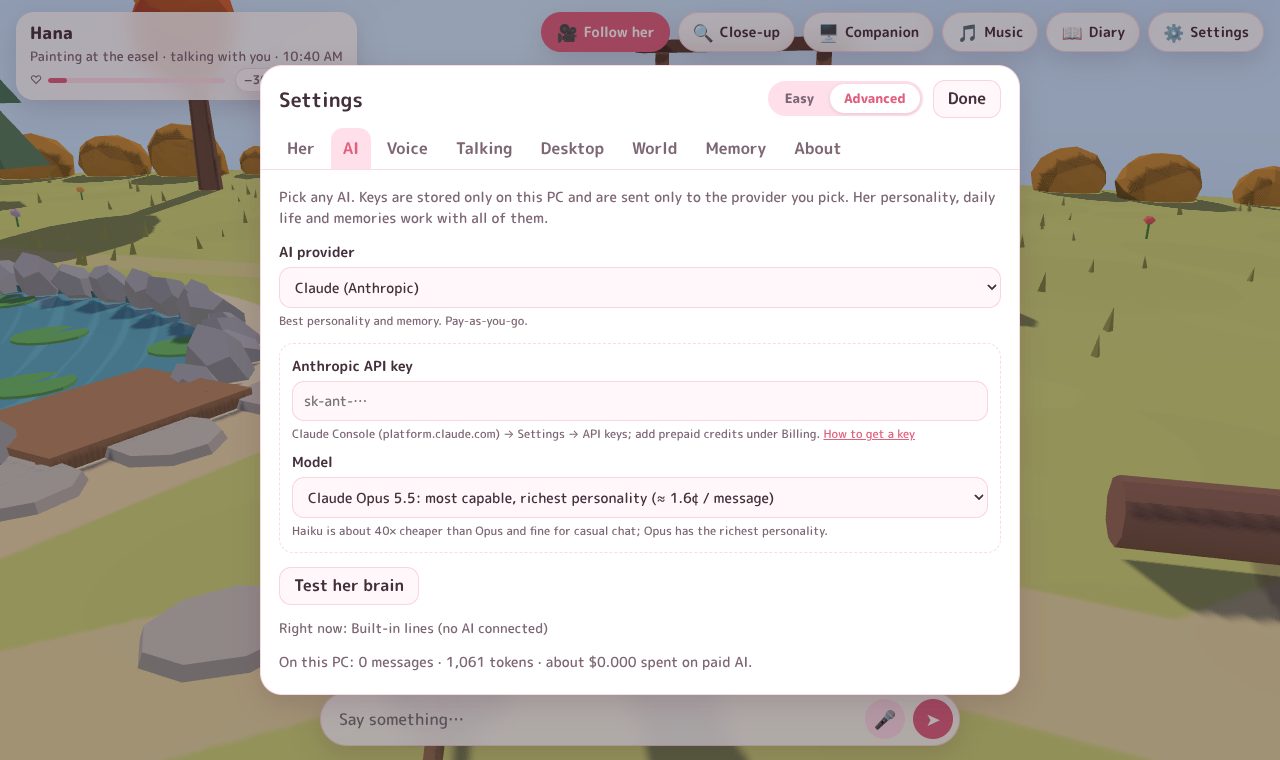
Providers: OpenRouter, Groq, Gemini, Claude, OpenAI, DeepSeek, Mistral, xAI, Cerebras, local apps (Ollama, LM Studio), or a small model that runs inside the app.
Claude (Anthropic)
- Go to platform.claude.com and sign in.
- Under Billing, buy a few dollars of prepaid credits and set a monthly spend limit.
- Under Settings → API keys, click Create key and copy it (
sk-ant-…). It's shown only once. - In Okaeri: Settings → Advanced → AI → Claude (Anthropic). Paste the key, pick a model, and click Test her brain.
Rough cost per message (her character, memories and the recent chat go along with each one):
| Model | Per message | 50 messages a day for a month |
|---|---|---|
| Opus 5.5 | ~1.6¢ | ~$25 |
| Sonnet 5.5 | ~0.8¢ | ~$12 |
| Haiku 5.5 | ~0.04¢ | ~$0.60 |
ElevenLabs (her voice)
- Sign up at elevenlabs.io. The free plan has 10,000 credits a month (about 140 short replies).
- Go to Developers → API Keys, create a key with Text to Speech and Voices (read) access, and copy it.
- Optional: pick or design a cute voice in the Voice Library or Voice Design, and add it to My Voices.
- In Okaeri: Settings → Advanced → Voice → ElevenLabs. Paste the key, click Load my voices, and pick one. Flash v2.5 is the fastest and cheapest model. Then click ▶ Test her voice.
Cost: about 0.7¢ per reply on Flash, so roughly $10 a month at 50 replies a day.
Other providers
- OpenRouter: "Connect OpenRouter" signs in with one click. With the model on Automatic, each message goes to whichever free model is up, so one busy model doesn't block her.
- Groq: free key from console.groq.com; very fast.
- Gemini: key from aistudio.google.com. Use a paid key if you're in the EU or UK (see above).
- DeepSeek, OpenAI, Mistral, xAI, Cerebras: paste a key from their website.
- Ollama / LM Studio: free and private on your own PC. Install the app, download a model, start it, and pick it in Okaeri. Nothing leaves your computer.
- Speech recognition with your own key: Settings → Advanced → Talking → My own key (Groq or OpenAI Whisper).
Her personality, daily life and memories work the same with every provider.