
Dark mode
On your desktop
Press 🪟 On my desktop and Hana steps out of her island onto your screen. She stands next to your apps in a see-through, always-on-top window, keeps you company while you work, and talks with you like she does at home.
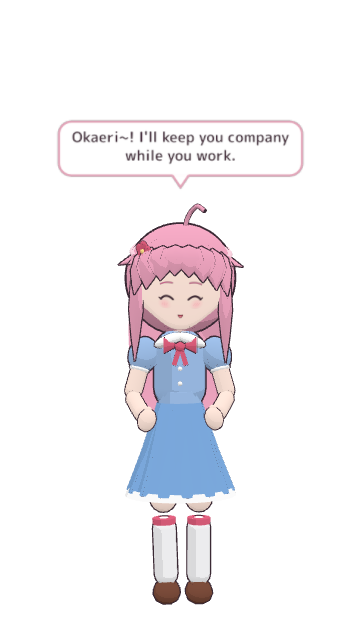
Going to the desktop
The first time, Okaeri asks before she hops over, because her home window closes while she's on your desktop (she can only be in one place at a time). Click Go to my desktop. Tick Don't ask again if you like; you can turn the question back on in ⚙️ Settings → Desktop → Ask before she hops onto the desktop.
What she does there
- Clicks go through to your apps, except on her. Work normally around her.
- Drag her anywhere, also to another monitor. When you let go she settles fully onto the screen nearest to her, so she never ends up cut in half between two monitors.
- She watches your cursor and turns her head to follow it.
- Click her for a reaction: pat her head, poke her cheek, high-five her hand. See Closeness.
- Talk by voice like at home (push-to-talk with Ctrl+Alt+Space works from any app), or right-click her → 💬 Talk for a chat box. See Talking to her.
- Her replies appear in a speech bubble above her.
The right-click menu
Right-click her for:
| Item | What it does |
|---|---|
| 💬 Talk | Opens a chat box next to her. |
| 🎤 Listen for her name | Turns listening for her name on or off. |
| 👀 Look at my screen | She glances at your screen and comments (see below). |
| 🎮 Watch me play | She watches you play and comments now and then (see below). |
| 🏠 Visit her home | Back to her island window. |
| Size | Small, Medium or Large. |
| ⚙️ Settings… | Opens Settings. |
| Quit Okaeri | Closes the app. |
Back to her home
Right-click her → 🏠 Visit her home. Or use the Okaeri icon in the system tray (next to the clock; it may hide behind the ^ arrow): click it to bring her window up, or right-click it for On my desktop / In her home (window), Talk to her, Settings… and Quit Okaeri.
Look at my screen
She can take a quick look at what you're doing and comment, like a friend glancing over your shoulder. Her own window is always left out of the picture.
- 👀 Look at my screen (at home in ☰ More, or in her right-click menu): one look, right now.
- 🎮 Watch me play: while you play a game, she comments about every 1, 2 or 5 minutes (Settings → Desktop). Each comment uses about 2 messages of your AI's free quota.
- Glance at my screen by herself (Settings → Desktop): never, rarely (about every 30 minutes) or sometimes (about every 10 minutes).
- Screen she looks at: Automatic (the screen your mouse was on before you clicked her) or one screen you pick, if you have several.
She asks first
She never looks unless you allow it. The first time, she asks, and the question says exactly where the picture goes: to your AI service in the cloud (in which case anything visible goes with it, so close private things like passwords, messages or banking first), or to a model on your own PC, where it stays. Okaeri doesn't store the screenshots. Switch it off any time: Settings → Desktop → Let her look at my screen.
While you work
In Settings → Desktop you can also set small talk, break reminders and whether she notices when you come back. See Closeness.
If she looks wrong
- A black box around her: right-click the tray icon → Troubleshooting → Black box behind her? Use software rendering. The app restarts.
- She's too big or too small: right-click her → Size.
- More in Troubleshooting.